Live-code GLSL shaders in your browser with Shader Lab
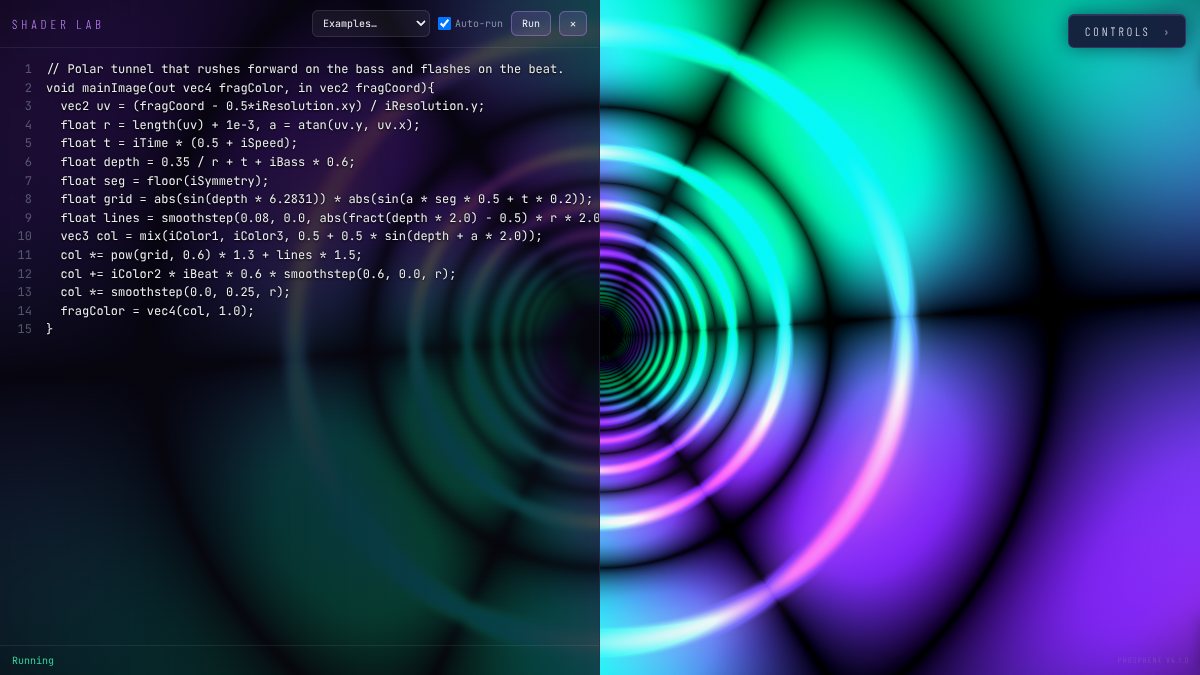
Shader Lab is Phosphene's twelfth engine: a code editor that runs your own GLSL fragment shader as a live, audio-reactive visual. Paste a Shadertoy sketch or write one from scratch. It recompiles as you type, reads the music, the beat and the current palette, and goes through the same color controls, effects and projection mapping as every other engine.
Open PhospheneFree, no sign-up. It runs in your browser.
Getting started
- Switch to Shader Lab. Press =, the key for engine 12.
- Open an example. Five come built in: Starter, Palette Plasma, Neon Tunnel, Spectrum Rings and Feedback Bloom. Starter is the smallest place to begin.
- Edit the code. With auto-run on, the shader recompiles as you type. Otherwise press Ctrl+Enter (Cmd+Enter on a Mac) to run it.
- Read any errors. Compile errors appear with their line numbers, and the last working shader keeps running, so a typo never blanks the screen mid-set.
- Keep it. Shaders save in the browser, and a share link carries your shader along with the rest of the scene.
Shadertoy compatibility
Shader Lab uses the same entry point as Shadertoy, so most single-pass sketches paste straight in:
void mainImage(out vec4 fragColor, in vec2 fragCoord)- Same core uniforms.
iResolution,iTime,iTimeDelta,iFrame,iMouseandiDatebehave as they do on Shadertoy.iMouseis fed by the mouse or touch. - Same audio layout.
iChannel0is a 512×2 audio texture laid out like Shadertoy's music input: row 0 is the FFT spectrum, row 1 the waveform, with the value in.r. A Shadertoy sketch that reads music fromiChannel0reacts to Phosphene's audio as is. - Fixed channels.
iChannel1is the camera or a loaded image andiChannel2is this shader's previous frame. If a sketch expects a texture in a different channel, change the channel it samples. - GLSL version. When the browser supports WebGL2, shaders compile as GLSL ES 3.00, with
texture(),tanh,roundand dynamic loops. Otherwise they compile as GLSL ES 1.00, withtexture()aliased so the same calls still work.
Anything not in the reference below, such as Shadertoy's Buffer A–D passes or the keyboard texture, needs reworking. The single feedback channel covers many multipass tricks: trails, smearing and slow accumulation.
Uniform reference
Everything your shader can read. Values marked 0–1 are normalized.
Shadertoy-standard inputs
| Uniform | Type | What it holds |
|---|---|---|
iResolution | vec3 | Output size in pixels |
iTime | float | Time in seconds |
iTimeDelta | float | Seconds since the last frame |
iFrame | int | Frame counter |
iMouse | vec4 | Mouse or touch position, with Shadertoy semantics |
iDate | vec4 | Year, month, day and time of day in seconds |
iChannel0 | sampler2D | Audio, 512×2: row 0 FFT, row 1 waveform, value in .r |
iChannel1 | sampler2D | Camera or loaded image |
iChannel2 | sampler2D | This shader's previous frame, for feedback |
Phosphene extras
| Uniform | Type | What it holds |
|---|---|---|
iBass, iMid, iTreble | float | Band levels, 0–1 |
iLevel | float | Overall level, 0–1 |
iBeat | float | Beat pulse, 0–1: jumps on a beat, then decays |
iBeatPhase | float | Position inside the current beat, 0–1, from the beat clock |
iBPM | float | Current tempo |
iColor0–iColor3 | vec3 | The current palette as four RGB colors |
iInput[4] | vec3 | Up to four interaction points from the mouse, body tracking or OSC: x, y in 0–1 with 0,0 at bottom left (like fragCoord), z = strength |
iSpeed, iWarp, iComplexity, iZoom, iSymmetry | float | The matching Tune sliders |
A short example
Rings that spread with the bass, brighten with the spectrum and flash on each beat, colored by whichever palette is active:
// Beat rings: paste over the Starter example
void mainImage(out vec4 fragColor, in vec2 fragCoord)
{
    // Centered coordinates, screen height = 1
    vec2 uv = (fragCoord - 0.5 * iResolution.xy) / iResolution.y;
    float r = length(uv);

    // Row 0 of iChannel0 is the FFT: low frequencies near the center
    float fft = texture(iChannel0, vec2(clamp(r, 0.0, 1.0), 0.25)).r;

    // Rings travel outward; more bass spreads them apart
    float rings = sin(r * (28.0 - 14.0 * iBass) - iTime * 3.0);
    rings = smoothstep(0.0, 0.1, rings) * (0.35 + fft);

    // Palette colors by distance, plus a flash on the beat
    vec3 col = mix(iColor0, iColor1, clamp(r * 1.4, 0.0, 1.0)) * rings;
    col += iColor2 * iBeat * 0.4 * (1.0 - clamp(r, 0.0, 1.0));

    fragColor = vec4(col, 1.0);
}
To add trails, mix in a slightly zoomed copy of the previous frame from iChannel2 before writing fragColor:
vec2 st = fragCoord / iResolution.xy;
vec3 prev = texture(iChannel2, (st - 0.5) * 0.985 + 0.5).rgb;
col = max(col, prev * 0.92);
Tips for live shaders
- Use the palette. Color with
iColor0–iColor3instead of hard-coded values, and the palette buttons and custom palettes recolor your shader like any other engine. - Hook up the sliders. Multiply your own constants by
iSpeed,iWarp,iComplexity,iZoomandiSymmetry, and the Tune sliders, along with any MIDI or OSC mapped to them, drive your code. - Two kinds of beat.
iBeatfollows the detected pulse.iBeatPhasecomes from the beat clock, so it's a steady ramp you can shape:pow(1.0 - iBeatPhase, 4.0)gives a sharp hit on every beat that stays on the grid. - Mind the coordinates.
iInputuses a bottom-left origin to matchfragCoord, while OSC input addresses use top-left. Phosphene converts between them; just don't flipytwice. - Write for both GLSL versions. If the show computer might fall back to WebGL1, avoid
tanhandroundand keep loop bounds constant, since GLSL ES 1.00 has neither those functions nor dynamic loops. - Test at show resolution. Effects and mapping run after your shader, so check the frame rate full screen on the projector, not in a small window. Fewer loop iterations is usually the fix.
- Sharing is safe by default. A shader inside a share link only runs after the viewer clicks Run, so nobody's GPU runs code they haven't chosen to.
Want people to steer your shader with their hands? iInput is fed by webcam body tracking and by OSC; the Kinect and OSC guide shows how to send it.
Open PhospheneIt's free, and there's nothing to install.